Compliance
Marketing consent
What consent means, why Australian law asks for it, how Keeperoo records it, and the short list of things you need to do to stay on the right side of it.
Plain English, not legal advice
This page explains how Keeperoo handles consent and points at the rules it is built around. It is not legal advice, and your circumstances may differ. The regulators' own pages are linked at the bottom — they are short, free and written for small businesses.
What consent is
Consent is the customer's permission to send them marketing. In Australia the Spam Act 2003 divides it in two:
- Express consent — they knowingly agreed. They ticked a box, filled in a form, said yes at the counter. This is the strong kind, and the kind Keeperoo's signup form is built to collect.
- Inferred consent — they gave you the address themselves, in a situation where it is reasonable to think they expect to hear from you. It is real, but it is weaker, and it is easier to get wrong than people expect.
Two rules that catch people out
- You cannot email someone to ask for consent. That email is itself a marketing message, so asking is already the thing you needed permission for.
- The burden of proof is yours. If it is ever questioned, you have to show you had consent — who gave it, when, and how. A list with no story behind it is not a defence.
Why it matters
- It is the law, and it applies to every business regardless of size. The Spam Act has no small-business exemption. The ACMA enforces it, and penalties for commercial messages sent without consent are substantial.
- It decides whether your email arrives at all. Gmail and Outlook watch complaint rates. Mail a list that did not ask for it and your messages stop reaching the people who did.
- It is the relationship. A loyalty program is a customer choosing to come back. Emailing them something they did not ask for is a strange way to thank them for it.
The practical test: could you show someone exactly when this customer said yes, and what they were shown when they said it? If yes, you are fine. If not, do not send.
How Keeperoo captures it
Consent is asked for once, on the signup form the customer fills in when they scan your QR code. You control what it says: open your card in Loyalty, go to the Sign-up form tab, and set the consent text to something a customer would recognise as a request to email them.
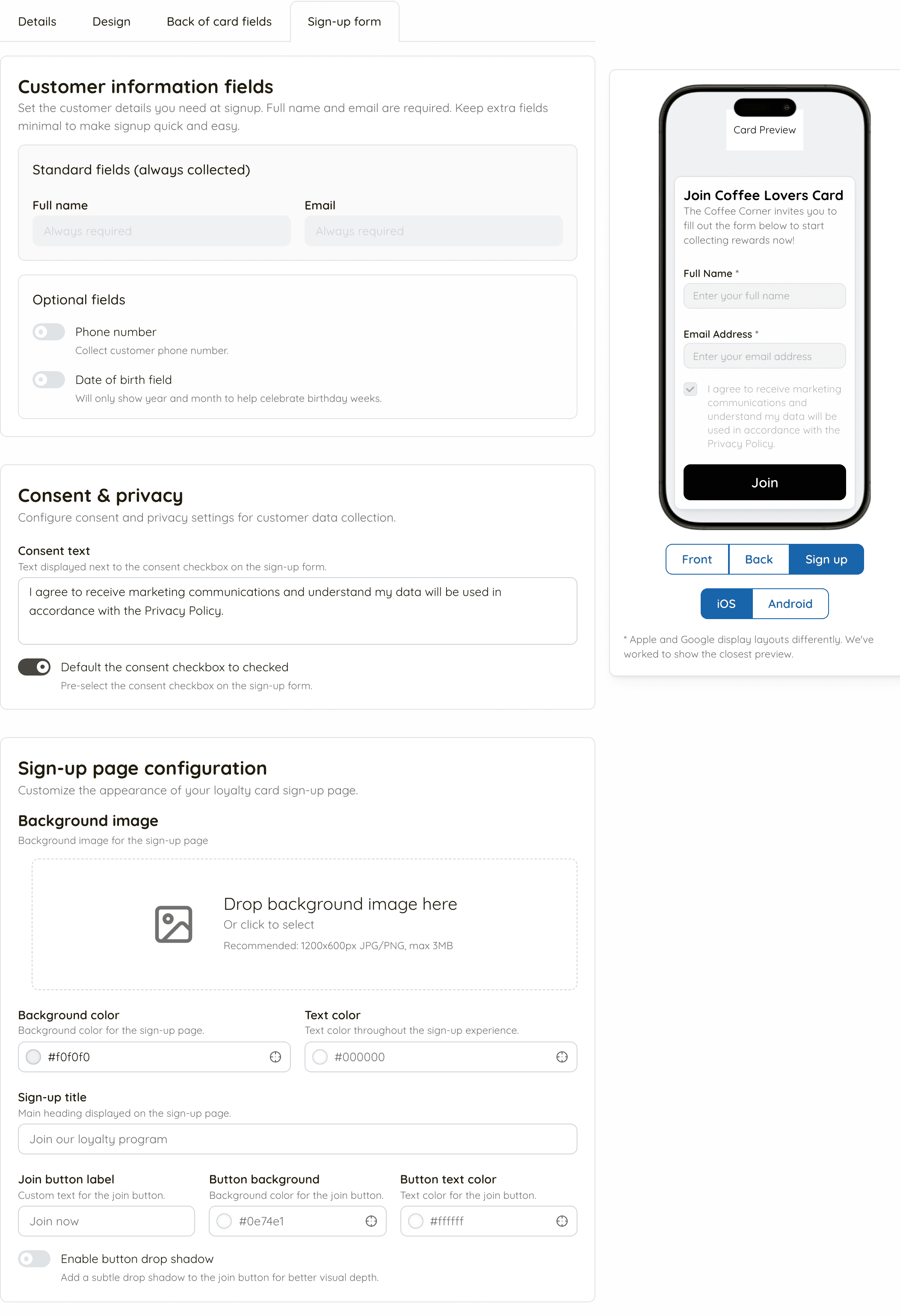
When they submit the form, Keeperoo records more than the yes or no. It keeps the evidence: the exact wording they were shown, whether the box arrived pre-ticked, which card they were joining, and when. That is the record you would produce if anyone ever asked.
Leave the box unticked
You can set the consent box to default to ticked. Think hard before you do. A pre-ticked box is much weaker evidence that the customer chose anything — and Keeperoo records that it was pre-ticked, so the weakness shows up in your own audit trail. A box they ticked themselves is worth more than the handful of extra signups a pre-ticked one buys.
Three answers, not two
Most systems store consent as a yes or a no. Keeperoo stores three states, because "we don't have their answer" is not the same as "they said no", and treating it as either one would be a lie:
Opted in
They said yes, and the record shows when and how. Email them.
Opted out
They said no, or later asked to stop. Never email them, until they themselves say otherwise.
Not recorded
No answer was ever recorded against this customer. Keeperoo's campaigns never email them. Whether you email them from your own email tool is your call, and your risk — see below.
About “Not recorded”
A customer shows as Not recorded when Keeperoo holds no answer for them. Usually that is because they were added without the signup form — at the counter, or from an earlier system — and for a period of signups the tickbox answer did not make it as far as the database, so those customers have no answer on file either.
It is not a finding that you have consent of any kind. It is an admission that nobody knows. Whether you may email one of these customers from your own email tool comes down to whether you have inferred consent in the Spam Act's sense: how you got their address, and whether they would reasonably expect to hear from you. That judgement is yours to make and yours to defend.
The clean fix is to ask. Next time they are in front of you, ask the question and record the answer; it takes ten seconds and turns a guess into evidence.
Where it can change
Five places, and all five land in the same record:
The signup form
The customer's own answer, with the wording they saw attached. This is the strongest evidence you will ever have.
The customer portal
The customer changes it themselves at keeperoo.au/portal, one setting per business. Opting out is exactly as easy as opting in, with no confirmation step and nothing to talk them out of it — which is what "easy to unsubscribe" means in practice. See the customer portal guide.
The unsubscribe link in your campaigns
Every campaign you send from Keeperoo has one in the footer. It opens a page where one tap opts them out, with no sign-in. The change is recorded straight away as Unsubscribe link, and any campaign already on its way to them stops.
Scanaroo, at the till
Staff can change it on the customer's screen when the customer asks them to, face to face. The reason is fixed to "Customer request in store", because that is the only thing it should ever be.
The dashboard
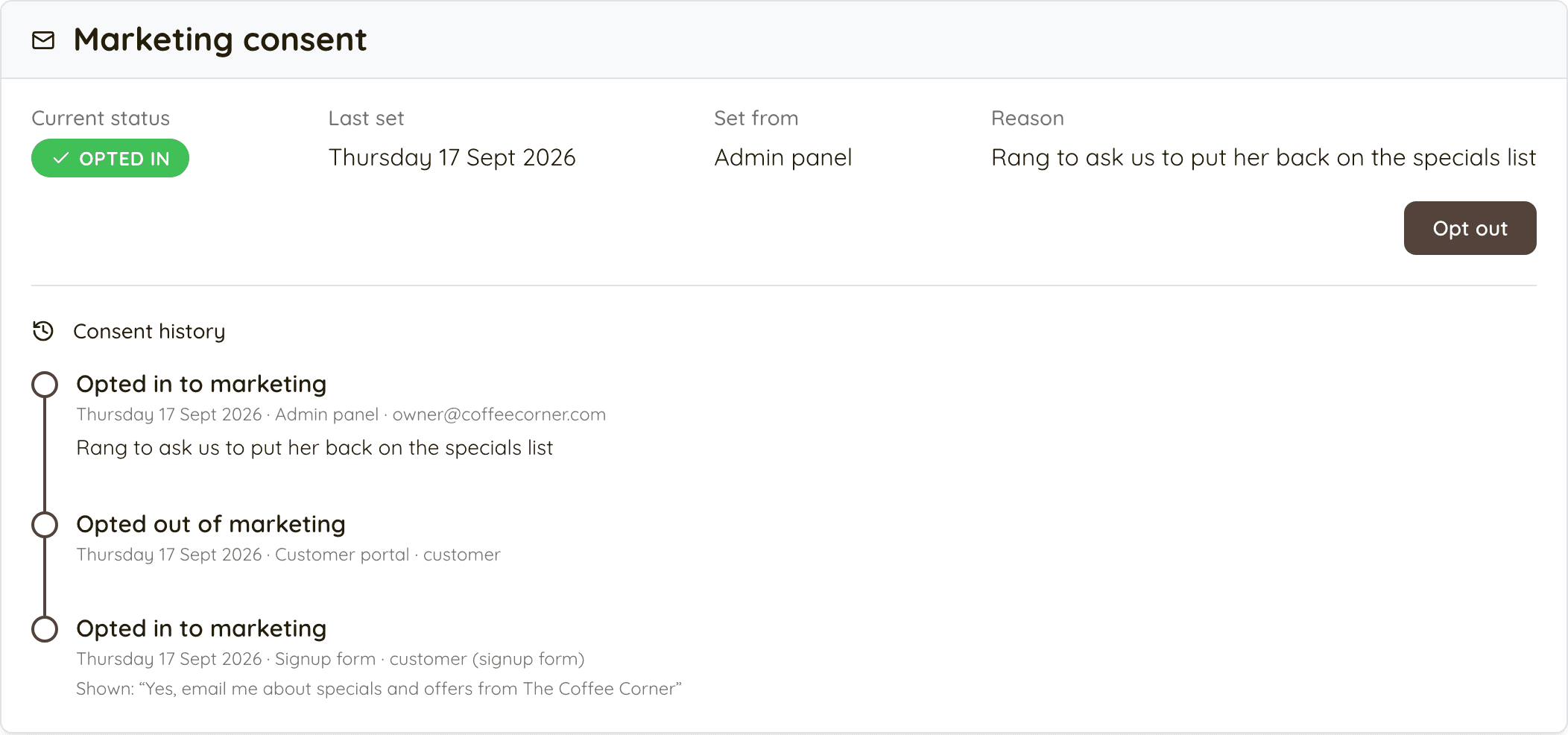
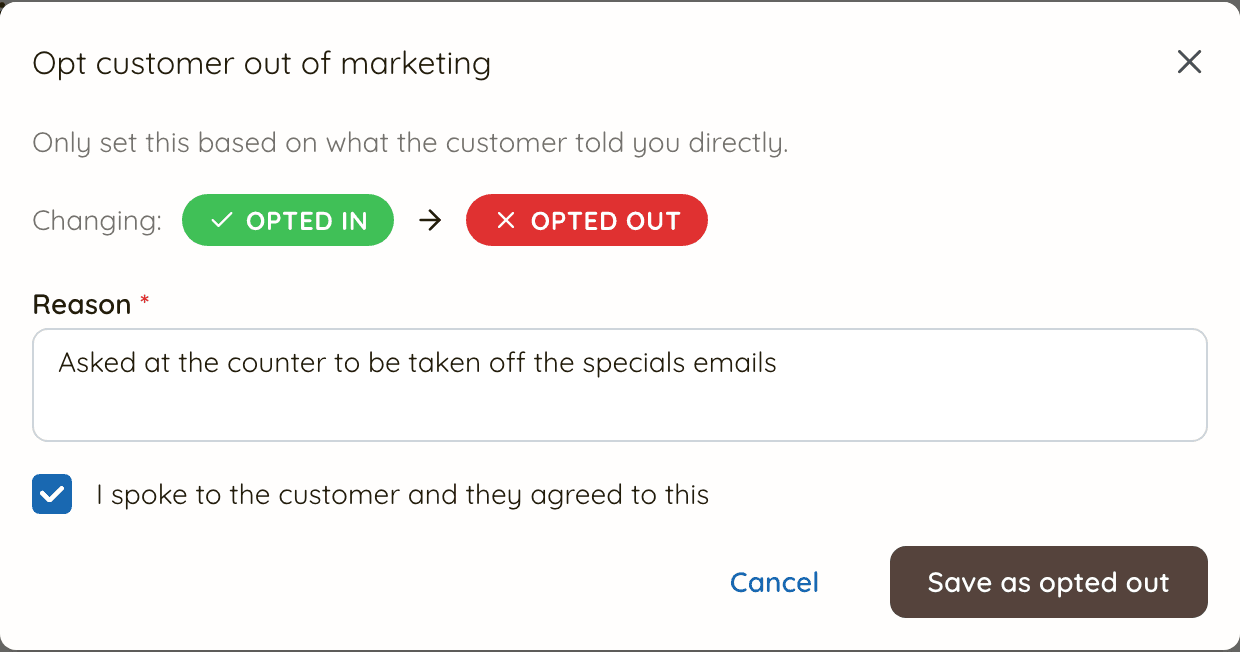
Open a customer in Customers and use the marketing consent card. Changing it asks you for a reason and makes you confirm that you spoke to the customer — both are recorded. That friction is on purpose: a consent record that anyone can quietly flip is not a record of anything.
One more change happens on its own: a customer who marks one of your campaigns as spam is opted out, shown as Email provider.
The history is the point
Every change is appended to a log that cannot be edited or deleted — not by staff, not by you, not by Keeperoo. Each entry carries what the answer changed to, where the change came from, who made it, why, and the wording the customer was shown if the change came from a form. If you are ever asked to prove consent, this is the answer, and it is on the customer's page in the dashboard.
What you have to do
Keeperoo collects and records the consent. The emails are yours, whether you send them from Keeperoo or from your own email tool, and so are the obligations that come with them. Keeperoo never sends your customers marketing of its own.
Sending from Keeperoo's Marketing page
Most of the rules are built in, so your part is mostly what the email says. See the campaign guide.
- Consent is checked for you. Only customers who are Opted in are emailed. Opted out and Not recorded customers never are, whatever your filters say, and it is checked again as each email goes out.
- Every email has a working unsubscribe. Keeperoo makes sure every campaign carries one, and an opt-out takes effect at once, well inside the 5 working days the law allows.
- Say who you are. Keeperoo's footer names your business and why the customer is getting the email, and replies go to your business email address. Keep your address at the bottom of your template (new templates start with it), and add your ABN if you trade under a different name.
- Be honest in what you write. The subject line and the offer are yours. Keep them accurate.
Sending from your own email tool
If you use Mailchimp, Klaviyo or similar instead, the whole list is yours:
- Have consent first. Export with the marketing consent filter set to Consented only and you are working from the people who said yes.
- Identify yourself accurately. Your real business name — and your ABN if you are using a trading name — plus a way to contact you, in the message itself.
- Include an unsubscribe that works. Clearly worded, easy to find, and it must not make them log in, create an account or hand over any more personal information.
- Honour an unsubscribe within 5 working days. Most email tools do this instantly; the five days are your outside limit, not your target.
- Bring opt-outs back into Keeperoo. When someone unsubscribes in Mailchimp or Klaviyo, record it against the customer here too. Otherwise your next export re-adds them and staff at the till have no idea.
One thing that is not marketing
The welcome email Keeperoo sends when a customer joins is transactional: it confirms what they just did and gives them their card. It goes out whatever they answered about marketing, and it is not a commercial message in the Spam Act sense. The same goes for portal sign-in codes. Your specials, offers and "we miss you" emails are, and they need consent.
Read the rules yourself
These are short, plain and written for businesses like yours. Twenty minutes on the first one is worth more than anything else on this page.
The three rules, in the regulator’s own words: get consent, identify yourself, make it easy to unsubscribe.
ACMA — Telemarketing and e-marketing: common issues and mistakes
What businesses actually get wrong, and what the ACMA does about it.
ACMA — Telemarketing and e-marketing
The hub page, including the Do Not Call Register if you ever phone or text customers.
The legislation itself, if you want the actual words.
OAIC — Privacy for organisations
Whether and how the Privacy Act applies to a business your size, and what it asks of you.
OAIC — The Australian Privacy Principles
The thirteen principles that govern how personal information is collected, used and stored.
Keeperoo's own handling of customer data is set out in our privacy policy.